Skip to content
Steps and Guide Step-by-Step Tech Solutions
  • Home
  • Printer Guides
  • Windows
  • Mac
  • Android
  • iPhone
  • Blog
Contact
Steps and Guide
  • Home
  • Printer Guides
  • Windows
  • Mac
  • Android
  • iPhone
  • Blog
Contact Support

All Troubleshooting Guides

How to Fix macOS Update Stuck, Freezing, or Claiming Insufficient Space Mac

How to Fix macOS Update Stuck, Freezing, or Claiming Insufficient Space

Overcome "An error occurred while preparing the installation" and free disk space required for macOS Sequoia / Sonoma...

1 min read • Sep 16, 2026
Read Guide →
How to Fix Built-in or Magic Keyboard and Trackpad Lag on macOS Mac

How to Fix Built-in or Magic Keyboard and Trackpad Lag on macOS

Stop stuttering mouse pointers, delayed keystrokes, and erratic scrolling gestures on MacBook and desktop Macs.

1 min read • Sep 16, 2026
Read Guide →
How to Fix External Monitor or HDMI Display Not Detected on Mac Mac

How to Fix External Monitor or HDMI Display Not Detected on Mac

Fix black screens on external displays with Option key display detection, USB-C DisplayPort handshakes, and resolution resets.

2 min read • Sep 16, 2026
Read Guide →
How to Safely Clean System Data and Purge “Other” Storage on Mac Mac

How to Safely Clean System Data and Purge “Other” Storage on Mac

Reclaim 30GB+ of SSD space by clearing Xcode caches, iOS device backups, Time Machine local snapshots, and app...

1 min read • Sep 16, 2026
Read Guide →
How to Fix AirDrop Not Finding Nearby Mac, iPhone, or iPad Mac

How to Fix AirDrop Not Finding Nearby Mac, iPhone, or iPad

Fix AirDrop discovery failures by adjusting visibility settings, disabling Mac firewall blocks, and toggling Bluetooth.

1 min read • Sep 16, 2026
Read Guide →
How to Fix Mac Sound Output Greyed Out or No Audio from Speakers Mac

How to Fix Mac Sound Output Greyed Out or No Audio from Speakers

Restore missing sound output devices, fix optical audio jack lockouts, and restart coreaudiod on macOS.

1 min read • Sep 16, 2026
Read Guide →
How to Stop Constant Spinning Beach Ball (Spinning Pinwheel) on Mac Mac

How to Stop Constant Spinning Beach Ball (Spinning Pinwheel) on Mac

Diagnose unresponsive apps, runaway CPU processes in Activity Monitor, and memory pressure bottlenecks.

2 min read • Sep 16, 2026
Read Guide →
How to Fix “Bluetooth: Not Available” and Disconnecting Audio on Mac Mac

How to Fix “Bluetooth: Not Available” and Disconnecting Audio on Mac

Reset the Bluetooth daemon (bluetoothd), clear com.apple.Bluetooth.plist, and restore connections to AirPods and Magic Mouse.

2 min read • Sep 16, 2026
Read Guide →
How to Fix Mac Connected to Wi-Fi But No Internet Access Mac

How to Fix Mac Connected to Wi-Fi But No Internet Access

Solve self-assigned IP address errors, corrupted network configuration plist files, and DNS issues on macOS.

2 min read • Sep 16, 2026
Read Guide →
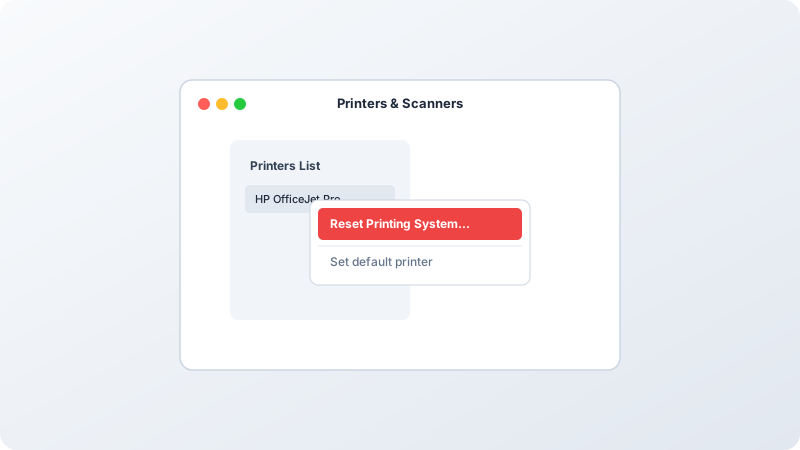
How to Reset the macOS Printing System in Sequoia & Sonoma Mac

How to Reset the macOS Printing System in Sequoia & Sonoma

Clear corrupted CUPS printer queues, remove ghost devices, and restore native AirPrint connectivity on your Mac.

2 min read • Sep 16, 2026
Read Guide →

Posts pagination

Previous 1 … 4 5 6 … 8 Next

Recent Posts

  • How to Roll Back Faulty Drivers in Windows Device Manager
  • How to Fix .NET Framework 3.5 and 4.8 Installation Errors on Windows
  • How to Temporarily Disable Driver Signature Enforcement in Windows
  • How to Fix “Unknown USB Device (Device Descriptor Request Failed)”
  • Step-by-Step Guide to Updating Motherboard BIOS / UEFI Safely

Recent Comments

No comments to show.
Steps and Guide

Simple Guides. Clear Solutions. Step-by-step tech troubleshooting for everyday computer, printer, and device problems.

Quick Links

  • Home
  • About
  • Blog
  • Contact

Guide Categories

  • Printer Guides
  • Windows
  • Mac
  • Android
  • iPhone

Legal

  • Privacy Policy
  • Terms & Conditions
  • Disclaimer

Important Disclaimer: stepsandguides.online info provides independent, educational content focused on printer connection, problem resolution, and upkeep.

We are NOT affiliated with or endorsed by any printer brands or software companies, including HP, Epson, Canon, Brother, Microsoft, or Apple. Any brand names, logos, or trademarks you see on our site are used only for reference and belong to their respective owners. Their presence here does not mean we have any partnership or official relationship with them.

© 2026 Steps and Guide. All rights reserved.

Independent educational tech guides and troubleshooting resources.